Flushing the PRESENCE indicator on a device
When a BLF light is blinking indefinitely, you can try to flush the PRESENCE information for that device to see if this fixes the issue.
When you click “Flush,” our system sends a SIP NOTIFY message to the device. This message resets the subscription state of the blinking LED, helping to clear any stuck or incorrect presence information.
Flushing the indicator
Section titled “Flushing the indicator”Follow these steps:
-
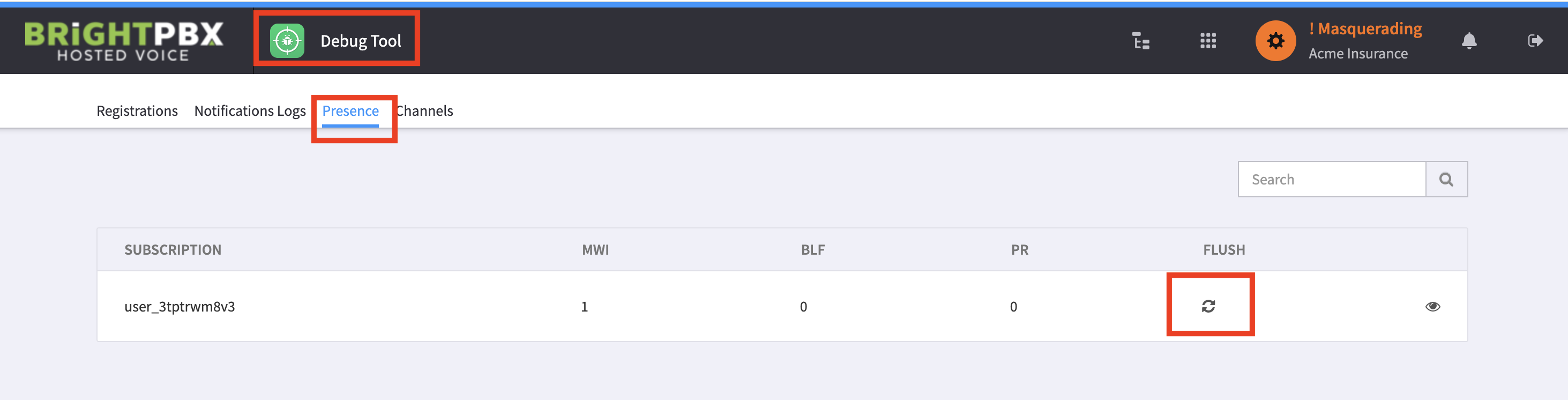
Open the Debug Tool, and choose the Presence tab.
-
Click the Flush button for the device that’s blinking.
If flushing doesn’t help
Section titled “If flushing doesn’t help”If this doesn’t resolve the issue, it could indicate a more serious problem, such as something blocking communication with the PBX. If this issue happens frequently, please refer to our guide for further troubleshooting.