Releasing or deleting a DID
When a customer leaves or a number is no longer needed, removing it from the account is a manual step — it does not happen on its own. Until you remove it, the number stays on the account and remains chargeable to you.
Removing the number
Section titled “Removing the number”-
Open the Number Manager app and choose the Spare Numbers tab.
-
Find the number and tick the checkbox beside it. A Delete and a Move To action appear above the list once at least one number is selected.
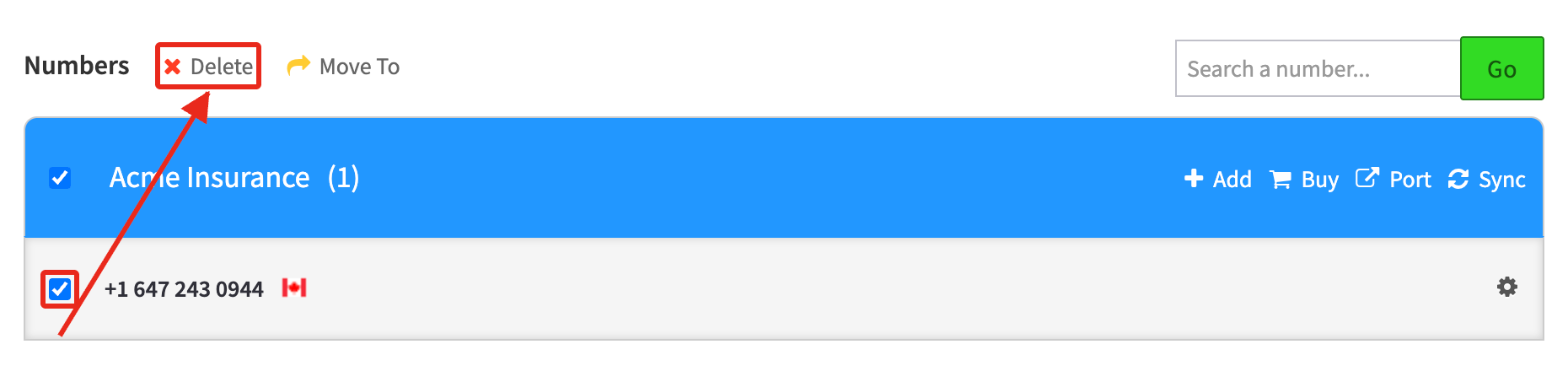
-
Click Delete, then confirm when prompted.
Moving it instead
Section titled “Moving it instead”If you are not finished with the number and only want it to sit somewhere else — for example back in your master account’s inventory — use Move To rather than Delete. See Moving DIDs between accounts.
Related
Section titled “Related”- Handling a port out request — removing the DID is the final step after a customer ports away
- Moving DIDs between accounts
- How do I add new DIDs?